Steps
The retriable building blocks of a workflow.
Steps are how a workflow does durable work. Each step runs once, its result is saved, and it becomes a checkpoint the workflow can resume from. Wrap every unit of real work in a step.
The console renders a run's steps as a graph, so you can see exactly where it is and what each step returned:
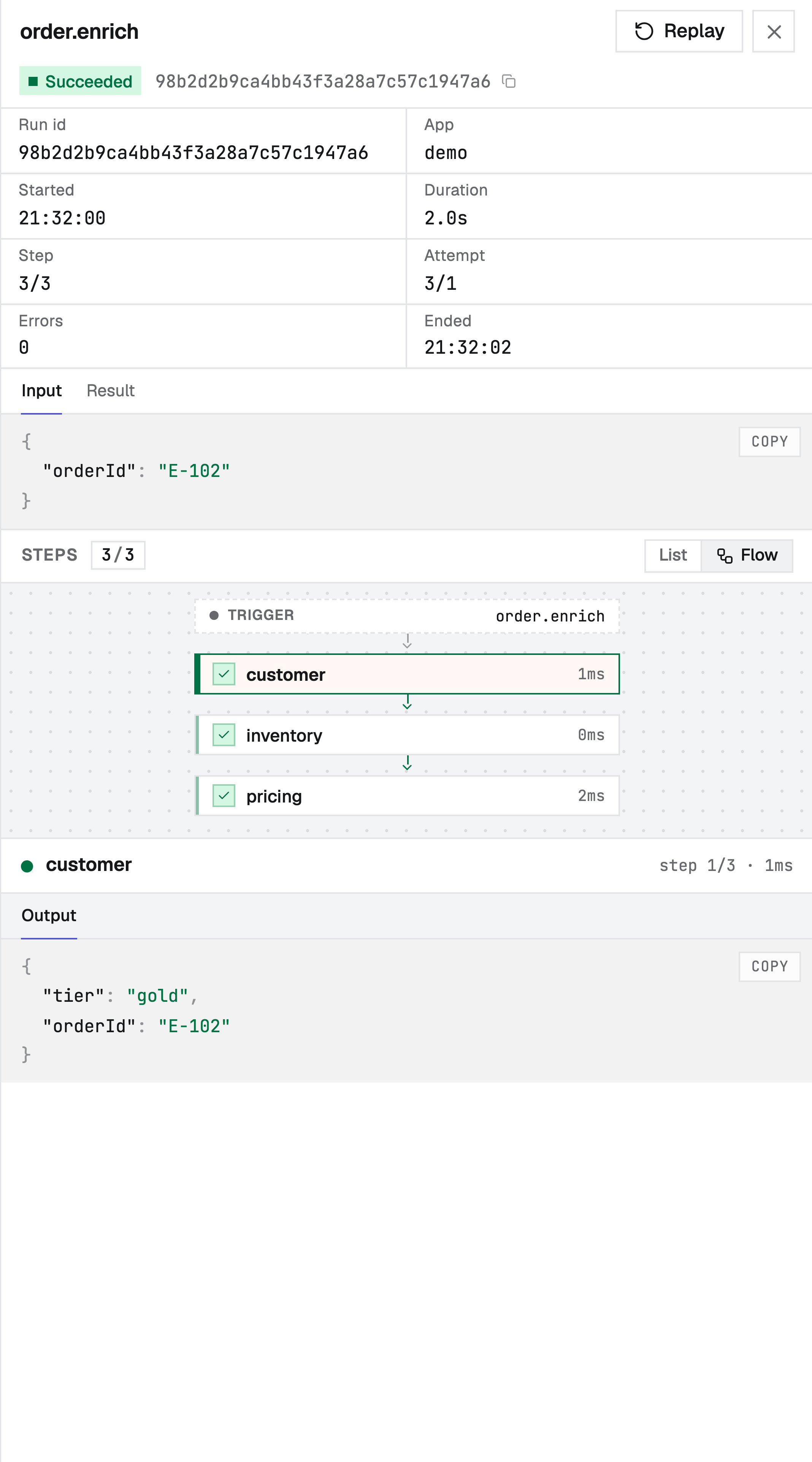
The run inspector offers three views of the same steps: a list, the flow graph above, and a
timeline that lays each step on a shared time axis - so a long sleep/waitForEvent shows as a
gap and parallel steps overlap, making it easy to see where a run spent its time.
Every step takes a unique id as its first argument; the engine keys the saved result by it.
| Method | Returns | Purpose |
|---|---|---|
step.run(id, fn) | the fn's value | Run a function once and memoize its result. |
step.sleep(id, duration) | void | Pause durably for a duration. |
step.sleepUntil(id, at) | void | Pause durably until an absolute time. |
step.waitForEvent(id, opts) | the event payload, or null | Pause until a named event arrives or the timeout elapses. |
step.runWorkflow(id, opts) | the child's result | Invoke another workflow as a child run and wait for it. |
step.emit(id, opts) | void | Publish an event from inside a run. |
step.run
Run a function once and remember its result.
const charge = await ctx.step.run("charge", () => chargeCard(order));The first time, the function runs and its return value is saved. On any later pass, step.run
returns the saved value without running the function again. The return value is whatever your
function returns (it must be JSON-serializable, since it's stored).
Put anything with a side effect or a changing result inside a step.run - API calls, database
writes, payments, reading the clock. See Durable execution for
why.
Recording a step's input
Pass an explicit input as the middle argument to record it on the step. It is also handed to the function, so the step reads its input from one place:
const charge = await ctx.step.run("charge", { orderId, amount: 4200 }, (input) =>
  chargeCard(input.orderId, input.amount),
);
The recorded input shows on the step's Input tab in the console. It is optional: the bare
step.run(id, fn) form captures no input (its arguments live in the function's closure, which the
engine cannot see). The structural steps below record their input automatically - a runWorkflow's
child input, an emit's payload, a waitForEvent's event and timeout, a sleep's duration - so the
Input tab is backed wherever a step has a meaningful input.
step.sleep
Pause the workflow for a duration. The wait is durable: the process can restart during it and the run still wakes up on time.
await ctx.step.sleep("wait-for-settlement", "1h");The duration is a string like "10s", "5m", "1h", or a number of milliseconds. Sleeps can be
short or span days - the engine owns the schedule, so nothing has to stay running in the meantime.
step.sleepUntil
Pause until an absolute instant rather than for a relative duration. Use it when the wake time is a fixed wall-clock target - midnight, a billing date, a scheduled send.
await ctx.step.sleepUntil("resume-on-renewal", subscription.renewsAt);| Argument | Type | Description |
|---|---|---|
at | Date | string | number | The absolute wake time: a Date, an ISO 8601 string, or epoch milliseconds. |
Reach for sleep when you mean "wait this long" and sleepUntil when you mean "wait until this
moment." Computing target - Date.now() to fake an absolute wait is wrong: it reads the clock outside
a step. A target already in the past wakes immediately.
step.waitForEvent
Pause until a named event arrives, or until the timeout elapses. Returns the event's data on arrival,
or null on timeout.
const approval = await ctx.step.waitForEvent("await-approval", {
  event: "order.approved",
  timeout: "24h",
});
if (approval === null) return { status: "expired" };| Option | Type | Description |
|---|---|---|
event | string | The event name that resumes this step. |
timeout | string | number | How long to wait before resolving to null. |
An incoming event resumes every run waiting on that name. The event must arrive after the run is parked - events are not retained.
step.runWorkflow
Invoke another workflow as a child run and wait for its result. The parent blocks until the child reaches a terminal state; if the child fails, the failure cascades to the parent.
const verdict = await ctx.step.runWorkflow("fraud", {
  name: "order.fraud-check",
  data: { orderId },
});| Option | Type | Description |
|---|---|---|
name | string | The child workflow to invoke. |
app | string | Optional. Invoke the workflow in this specific app. Omit to resolve the name in the calling app first, then any other app. |
runner | string | Optional. Pin the child to a specific runner within the target app. |
data | unknown | Optional input passed to the child as its event data. |
When two apps define a workflow with the same name, set app to target one exactly:
const charge = await ctx.step.runWorkflow("charge", {
  name: "charge",
  app: "billing",
  data: { orderId },
});
step.emit
Publish an event from inside a run. It can trigger other workflows or resume waitForEvent steps.
await ctx.step.emit("notify", {
  name: "notification.requested",
  data: { orderId, kind: "shipped" },
});| Option | Type | Description |
|---|---|---|
name | string | The event name to publish. |
app | string | Optional. Deliver only to workflows in this app. Omit to deliver to every workflow that triggers on the event. |
data | unknown | Optional event payload. |
Step ids
The first argument to every step is its id ("charge", "wait-for-settlement"). The id is how
Durablex matches a step to its saved result across passes, so:
- Give each step a unique id within a workflow.
- Keep ids stable - don't compute them from changing values like timestamps or array contents.
Ordering
Steps run top to bottom, one after another. Each await completes before the next step begins, which
is what lets a workflow resume at exactly the right place.
const charge = await ctx.step.run("charge", () => chargeCard(order));
await ctx.step.sleep("settle", "1h");
const ship = await ctx.step.run("ship", () => createShipment(charge));
If this run is interrupted after charge, it resumes at the sleep; after the sleep, it resumes at
ship. Completed steps are never repeated.
Parallel steps
Run independent steps concurrently with Promise.all - the engine discovers the whole batch in one
pass and runs the branches together instead of one per round trip.
const [user, prefs, plan] = await Promise.all([
  ctx.step.run("user", () => fetchUser(id)),
  ctx.step.run("prefs", () => fetchPrefs(id)),
  ctx.step.run("plan", () => fetchPlan(id)),
]);
Each branch is still its own durable step with its own id and saved result. The workflow continues
past the Promise.all only after every branch has completed - the join. Branches can mix step
kinds; a parallel step.sleep or step.waitForEvent parks alongside the others, and the run wakes
as each deadline arrives.
If one branch fails after exhausting its retries, the run fails (the same
as Promise.all rejecting) and its still-running sibling steps are cancelled - nothing is left
dangling. Use Promise.allSettled instead when you want every branch to finish regardless.
One caveat: batching is best-effort. A branch that does its own await (an un-stepped fetch, say)
before calling its step.run may be discovered on the next pass rather than with its siblings. It
still runs correctly - it just costs an extra round trip. Call your steps directly inside the
Promise.all to keep them in one batch.