Events API
Trigger workflows by sending an event, and read the durable event log.
An event is how you start a workflow from outside the engine. POST /events ingests one event; the
engine matches it against every workflow trigger in the namespace and
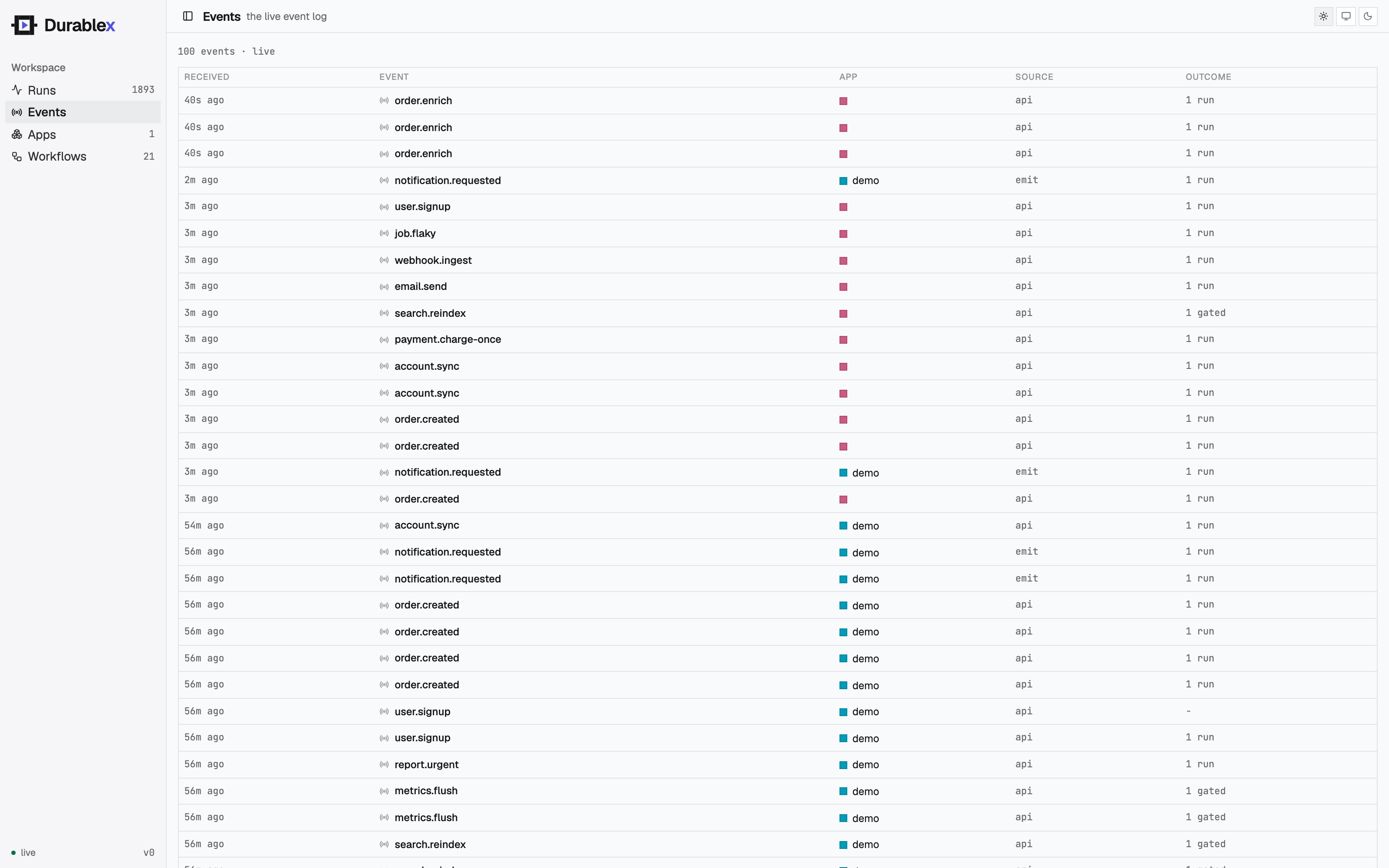
returns what it started. Every ingested event is also kept in a durable
event log you can read and tail.
Send an event
curl -X POST $DURABLEX_ENGINE_URL/events \
  -d '{"name":"order.created","app":"order-app","data":{"orderId":"A1"}}'
import { createClient } from "@durablex/sdk/client";
const dx = createClient({ engineUrl: process.env.DURABLEX_ENGINE_URL! });
const res = await dx.events.send({
name: "order.created",
app: "order-app",
data: { orderId: "A1" },
});From the console
Each workflow's detail panel has a Run button that opens a payload editor pre-filled with that
workflow's triggering event. Edit the JSON and run it - the console fires the event through the same
POST /events path, so it is a real trigger, not a private invoke: any other workflow whose trigger
matches the event runs too.
A few cases shape what the button does:
- A workflow with no explicit trigger runs on an event matching its own name, so that name is pre-filled.
- An event trigger with a CEL
iffilter shows the filter as a hint- the payload you enter has to satisfy it for the workflow to run.
- A wildcard pattern (
order.*) pre-fills the prefix for you to complete into a concrete name. - A cron-only workflow has no event to fire, so its Run button is disabled - cron workflows fire on their schedule.
Request body
| Field | Type | Meaning |
|---|---|---|
name | string, required | The event name workflows trigger on. |
app | string | Scope the event to one app's triggers. Omit to broadcast namespace-wide. |
data | any JSON | The event payload, delivered as ctx.event.data. |
dedupeId | string | Drop a duplicate event with the same id within the dedupe window. |
runner | string | Pin runs started by this event to a specific runner. |
targetApp | string | Route a cross-app trigger to a specific app. |
Response
202 Accepted. The body reports what the event did:
{
  "runId": "01HXYZ...",
  "woke": 0,
  "triggered": [
    { "workflow": "fulfillment", "runId": "01H..." },
    { "workflow": "audit", "runId": "01H..." }
  ]
}| Field | Meaning |
|---|---|
runId | The run started, when exactly one workflow matched. |
woke | How many waiting runs this event resumed (via step.waitForEvent). |
triggered | One entry per matched workflow: its workflow name, the app the run landed in (set even for cross-app fan-out), and the runId started. |
skipped / dropped / debounced / batched / deduped | Flow-control outcomes - set when the event was held back rather than run immediately (see flow control). |
suspended | true when the namespace is suspended: in-flight waiters were still woken, but no new run was started. |
An event that matches nothing still returns 202 with an empty triggered - it is recorded, not lost.
Each triggered entry's runId resolves to a run, and that run records the event back: its
eventId is this event's id (see runs). List every run one event fanned out
with GET /runs?eventId=<id>. Cron, child (step.runWorkflow), and on-failure runs carry no
eventId - they have no triggering event.
Reading the log
The log records every event with what it did, newest first.
| Method + path | Returns |
|---|---|
GET /events | A page of event records. Filter with ?app=, ?name=, ?limit=. |
GET /events/{id} | One event record. |
GET /events/stream | A live tail of incoming events (Server-Sent Events). |
curl "$DURABLEX_ENGINE_URL/events?app=order-app&name=order.created&limit=20"Each record carries the event (name, app, data), its source (api for an external POST,
emit for a workflow's step.emit), when it arrived, and the triggered fan-out:
{
  "id": "9f2b...",
  "name": "order.created",
  "app": "order-app",
  "source": "api",
  "data": { "orderId": "A1" },
  "receivedAt": "2026-06-15T09:00:00Z",
  "woke": 0,
  "triggered": [{ "workflow": "fulfillment", "runId": "01H..." }]
}
The stream is a best-effort live view - a slow or reconnecting client can miss events. GET /events
is the complete record.